

AI spend Finance cannot attribute gets surfaced and actioned inline.
Allocation Gaps are not compliance violations. They are attribution gaps that prevent Finance from answering "who owns this spend?" FinOps Center detects six gap scenarios and routes each to the right action, without leaving the governance view.
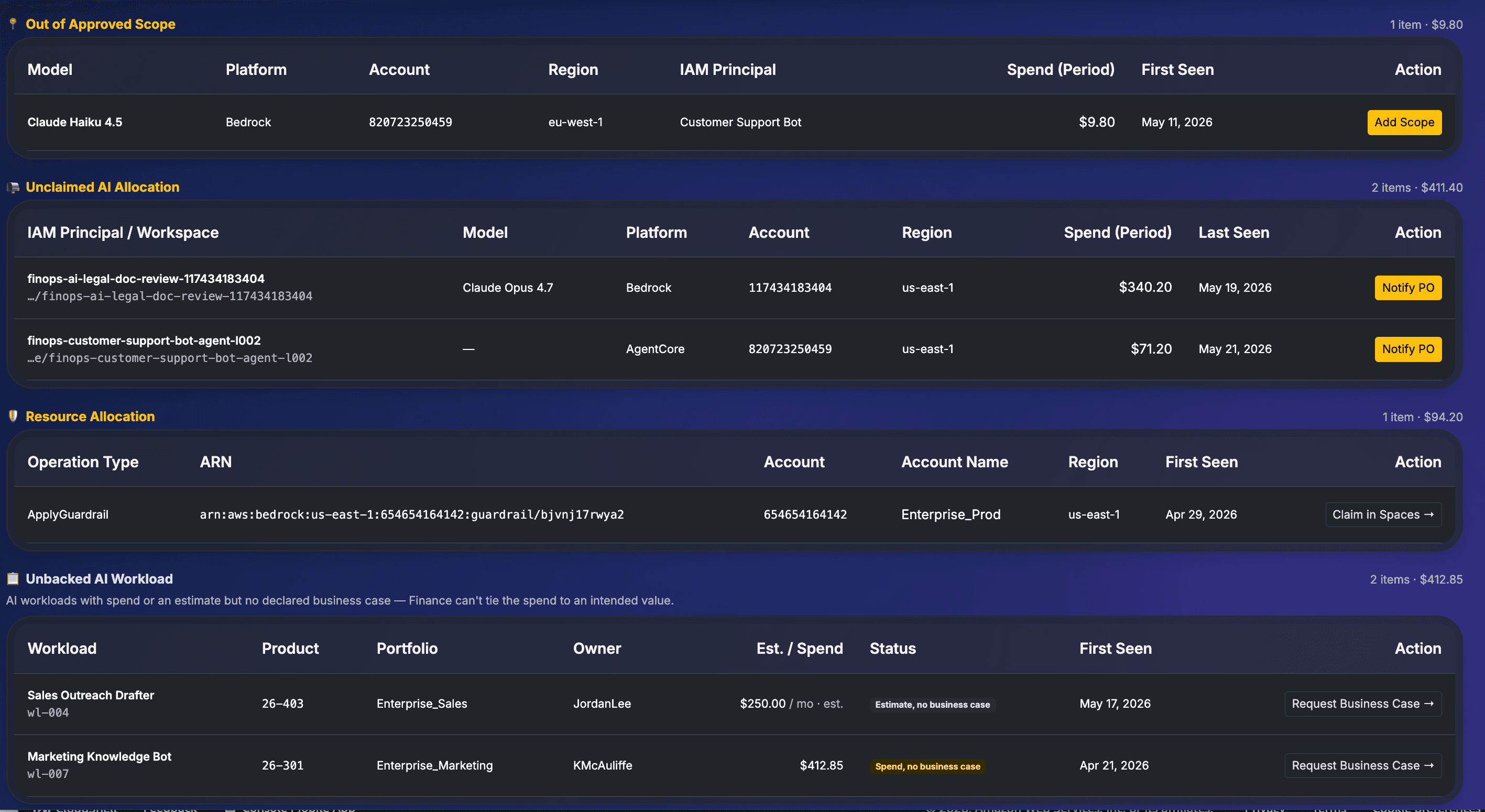
Allocation Gaps view: declared AI value opportunity at the top (Cost Saving and Revenue Driving shown separately), six gap categories below with spend totals and inline actions per row.
Declared by requesters: intended annual value, not realized return. The gap view shows the declared opportunity alongside active gaps so the FinOps Lead can see what value is at stake when deciding how urgently to act on attribution gaps.
Six Gap Scenarios
Every gap scenario has a named cause,
a named action, and an audit record.
The caller is AWSAdministratorAccess, AWSPowerUserAccess, or a similar shared SSO role. The identity is known but the workload is not. Spend cannot be routed to a specific workload budget. This is not a security issue; it is an attribution gap. The fix is a dedicated role scoped to the workload.
line_item_iam_principal matches a known broad role pattern
A model is being called in AWS with no corresponding Business Request in FinOps Center. The invocations are real, the cost is real, and no Product Owner has a workload claim or declared business case. The model was never through the governance workflow.
line_item_iam_principal present but no matching WorkloadRecord or approved BR
The model has an approved Business Request, but CUR shows usage in an account or region not included in the original approval. The approval boundary has been exceeded. The FinOps Lead can add scope to cover the actual deployment or flag for the CE to move the resource.
Approved model appears in account or region outside the ModelApprovalScope
A finops-ai-* IAM role or Claude Platform workspace was created through the CE task workflow and has spend in CUR, but no Product Owner has claimed it in Spaces. Attribution is halfway there: the role exists, the spend exists, but accountability is not yet established.
line_item_iam_principal matches finops-ai-* pattern with no ClaimedResourceRecord
Guardrail rows appear in CUR with their ARN as line_item_resource_id. Unlike model invocations, Guardrail rows never emit line_item_iam_principal, so the Guardrail ARN is the only attribution anchor. If no workload claims the ARN, this spend cannot be allocated.
line_item_operation = ApplyGuardrail with no matching workload claim on the ARN
A workload has real spend or a set estimate but no declared business case. Finance cannot tie the spend to an intended value. The workload owner has not declared what this AI investment is funded to produce. This is a value governance gap, not just an attribution gap.
Claimed workload with spend or estimate present, BusinessCaseTable entry absent
Every decision is audited, not just snapshotted.
When a FinOps Lead actions a gap (approving, assigning, creating a Business Request), the record moves from Active to Actioned to Resolved. If circumstances change, a decision can be Recalled and revisited. The original decision is never deleted.
Every action carries a timestamp, rationale, and the identity of the person who made it. Finance gets an audit trail. These are allocation gaps, not compliance violations. The goal is always attribution: connecting every AI dollar to a budget owner.
Why attribution matters in shared accounts
When two budgets share an AWS account, every Bedrock dollar is split evenly regardless of who made the call. When a workload's IAM role is claimed, that spend exits the shared pool and flows to the right budget. Without workload-level attribution, shared accounts systematically mischarge non-AI budgets for AI spend, and nobody has the data to correct it.
Split 50/50 between all budgets in the account regardless of actual usage
100% to the correct workload budget. Every dollar to the right owner
Close the gaps. Connect every AI dollar to a budget owner.
Six gap scenarios, detected automatically. Every gap with an inline action, an audit trail, and a status lifecycle. FinOps Center turns attribution gaps into governed decisions.