FinOps Center logo
FinOps Center

The Control Plane for AWS Cloud Financial Management

Built for the business teams who own the budget — not the engineers who built the infrastructure. FinOps Center translates complex AWS costs into business language and gives Product Owners, Finance teams, and Department Managers real control over cloud spending without touching the AWS console.

The problem with AWS billing today.

WHY DID WE BUILD?

AWS is powerful. AWS billing is not built for business teams.

Your Finance leaders see account-level totals with no context. Your Product Owners have no visibility into what their workloads are spending. Your Department Managers can't approve or dispute charges without an engineering ticket. And your FinOps team spends more time translating AWS jargon than driving savings.

FinOps Center changes that.

HOW FINOPS CENTER SIMPLIFIES AWS

AWS accountsyour financial structure

Map AWS to the hierarchy your business already uses

AWS organises your infrastructure by accounts, regions, and services. FinOps Center maps all of that to Business Unit → Department → Portfolio → Product. Every report, every budget, every approval uses your language — not AWS's.

shared accountsowned workloads

Put resources in the hands of the teams that own them

In AWS, shared accounts mean no clear ownership. FinOps Center lets Product Owners claim individual resources — databases, servers, AI models — to their workloads directly. Once claimed, 100% of that cost belongs to that team from day one. No AWS console access required.

raw cost databusiness decisions

Move from line items to answers

AWS gives you line items. FinOps Center gives you answers — which workload is over budget, which savings are waiting for approval, which AI applications are driving unexpected spend, and how each team is tracking against the estimate they committed to.

CORE FEATURES

Everything your team needs. Nothing they don't.

Financial Hierarchy Mapping

Translate AWS accounts and resources into your org structure. Business Unit → Department → Portfolio → Product. Everything in FinOps Center uses your labels — not AWS account IDs or service codes.
Account Allocation

Allocate AWS accounts to financial budgets by percentage. A shared account split between two teams? 60/40. A dedicated account? 100%. Every dollar accounted for, every month.

Workload Resource Claiming

Product Owners claim AWS resources to their workloads in a simple interface. EC2, RDS, S3, Bedrock — any resource with an ARN. Once claimed, it belongs to that workload. Cost follows ownership.

Cloud Spend Cards

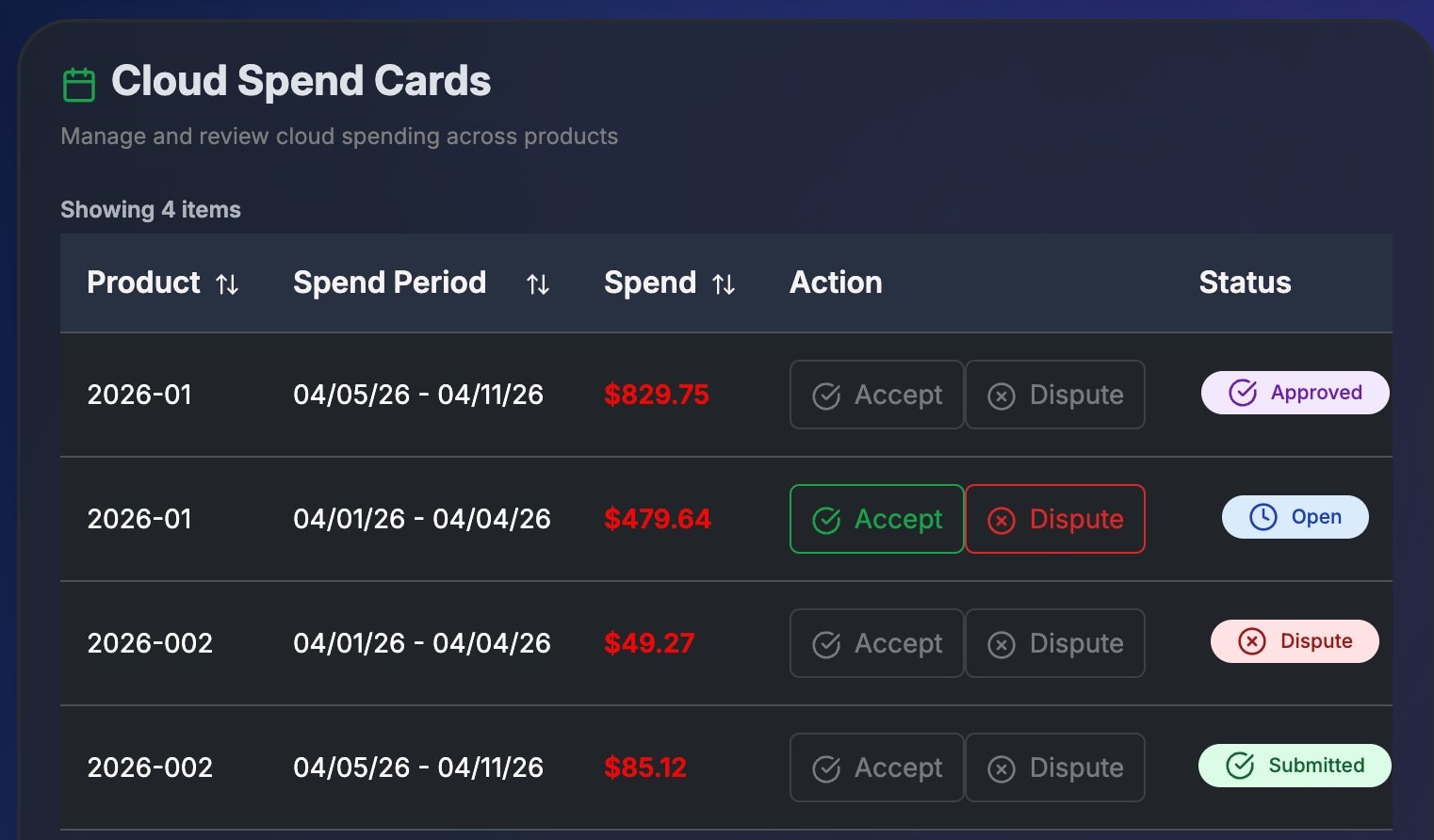
Weekly spending periods delivered to Product Owners for review. Accept if the numbers look right. Dispute if something seems off. A clear record of who reviewed what and when — no AWS console login required.

Savings Management

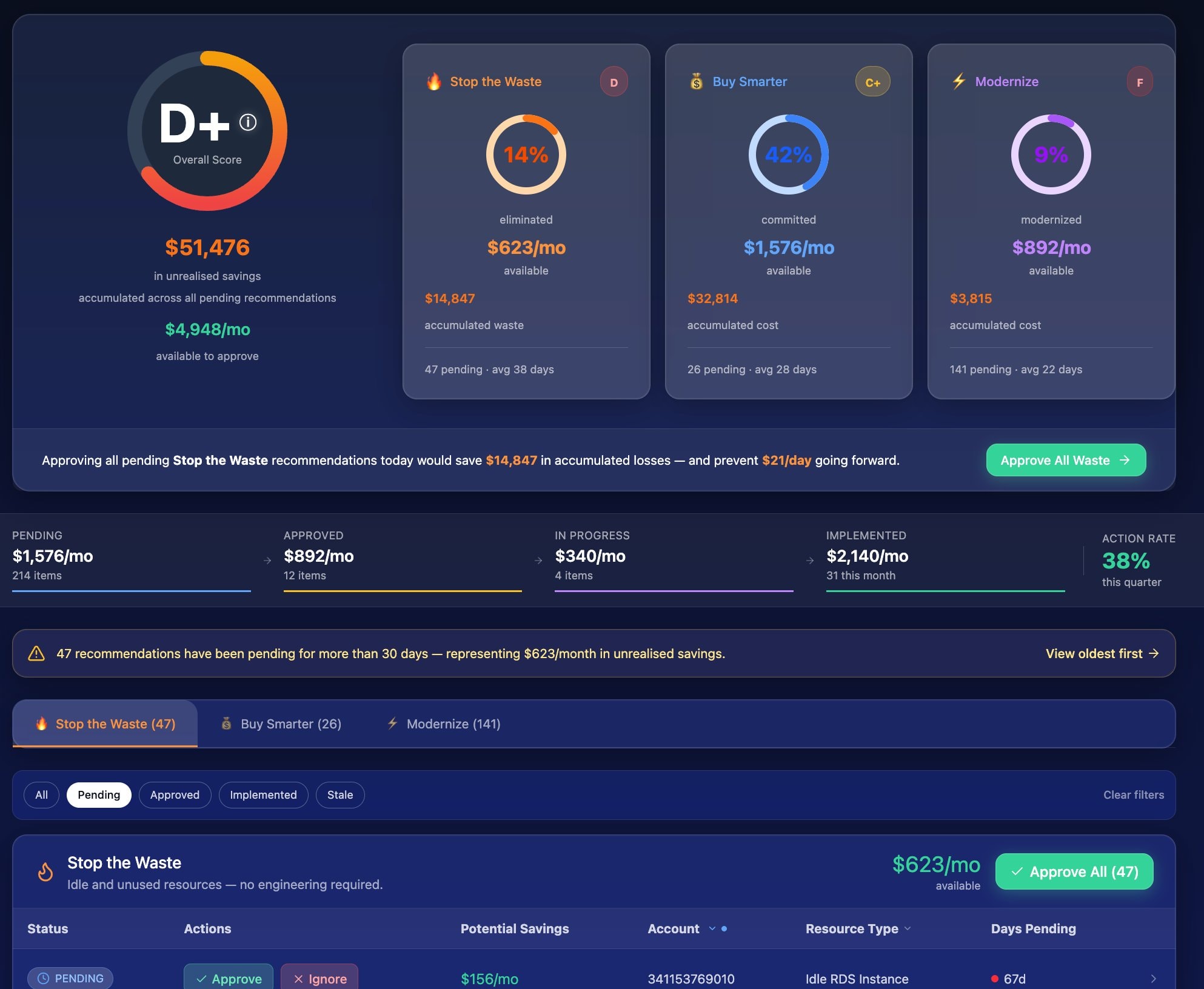
AWS optimization recommendations surfaced in plain English. FinOps Leaders approve, ignore, or implement. Admins execute through CloudScal3 Tools. Product Owners see the results. Full approval workflow with audit trail — no engineering bottleneck.

Budget Tracking

Annual and period budgets tracked against actuals in real time. Current Period spend, Current Month spend, available budget remaining, and trend analysis — all visible to the right people at the right level of detail.

MAP Contract Management

AWS Migration Acceleration Program contracts tracked end-to-end. Eligible resources identified automatically. Tagging tasks routed to Cloud Engineers. Credit utilisation visible to FinOps Leaders.

See the full MAP solution

AI Cost Governance

Amazon Bedrock spending attributed to the application making the call — not just the account it runs in. Set token budgets by workload. Track input, output, and cache consumption. Govern which AI models your teams use.

See the AI Cost Governance solution

Agent Bill — AI Financial Assistant

Ask Agent Bill anything about your AWS spending in plain English. He knows your hierarchy, your budgets, and your history — and answers differently depending on whether you're a Product Owner, FinOps Leader, or Finance Admin.

Meet Agent Bill

MEET YOUR AI FINANCIAL ASSISTANT

Ask Agent Bill anything about your AWS spending.

Agent Bill knows your hierarchy, your budgets, your workloads, and your history — and answers differently depending on whether you're a Product Owner, FinOps Leader, or Finance Admin.

Product Owner

"Why is our AI spend so high this week?"

Agent Bill
Agent Bill

Your AI spend is up 4× this week, driven by the AI Modernization workload in your Operations department. The Bedrock model your team selected switched from Claude Haiku to Claude Sonnet — average cost per request increased from $0.012 to $0.048. Want me to flag this to the workload owner?

FinOps Leader

"Are we going to exceed budget this month?"

Agent Bill
Agent Bill

At current run rate, you'll exceed your AI estimate by ~$180 this month. Your cache hit rate is strong — if it stays above 60%, the overage will be closer to $90. Two Savings Plan recommendations are also pending FinOps Leader approval that would offset roughly $300/mo if implemented.

BUILT FOR EVERY ROLE

The right view for every stakeholder.

FinOps Center adapts to your role. Everyone sees the information relevant to them — nothing more, nothing less.

FinOps Leader

Full org-wide visibility. Approve savings recommendations. Manage MAP contracts. Allocate credits. Set governance policy.

Product Owner

Own your workload's spending. Claim resources. Create estimates. Review and accept Cloud Spend Cards. Designate MAP workloads.

Financial Admin

Configure account allocations. Manage users and roles. Set up MAP contracts. Define the financial hierarchy for your organisation.

Cloud Engineer

Work through the MAP tagging queue. Apply compliance tags to eligible resources. Set up Bedrock inference profiles for AI MAP workloads.

Department Manager

See your department's total spending across all products and portfolios. Track budget vs actual. Understand trends.

WHERE IT RUNS

Your data never leaves your AWS account.

FinOps Center deploys directly into your AWS environment via AWS Marketplace. Authorization flows through your own identity layer — no shared infrastructure, no data sharing agreements.

Deployed inside your AWS account

Installed via AWS Marketplace and CloudFormation directly into your environment. No shared multi-tenant infrastructure. No data hops to a vendor cloud.

Your own Cognito + AppSync

Identity governed by your existing Cognito user pools. Authorization through your own AppSync layer. The same security controls you already trust — no new auth model to audit.

No third-party data transmission

Every allocation, approval, budget, and report lives in your account. Your cloud spend data stays exactly where it should — under your control, under your governance.

FinOps In-a-Box (hourly)

Pay-as-you-go flexibility

$0.99/hr
Try for Free
Full Features
10 Accounts

FinOps In-a-Box

A cost-effective annual plan

$5k/yr
Buy Now
Full Features
25 Accounts

Enterprise

Comprehensive enterprise solution

$30k/yr
Buy Now
Full Features
Unlimited Accounts