FinOps Center
AI Cost Governance

Govern AI Spend.
Accelerate AI Adoption.

Every AI dollar. Owned. Attributed. Governed.

Governance is not a brake on AI adoption. It is what lets enterprises scale AI consumption confidently. FinOps Center gives every budget owner a governed path from model approval to spend accountability: an approved model, a scoped IAM role, and a named budget owner before the first token, entirely within your own AWS estate.

4

AI platforms governed: Bedrock, AWS Marketplace Models, Claude Platform, and AgentCore, under one approval framework

6

Allocation Gap scenarios detected and actioned, from unattributed spend to unclaimed workloads

Weekly

Spend Cards per claimed workload: actuals vs estimate, by model, token type, and region

<2 days

from Business Request to a governed, running AI workload. The governed path is the fast path.

AI implementation needs to start with business approval, not with an engineering team enabling a new model and using it.

WHY DID WE BUILD?

Ask most enterprise teams these questions and see how many they can answer:

  • When a new foundation model becomes available, what is your process to approve it for use: in which regions, for which actions, and by which teams?
  • How does anyone in your organization know a new model is being used right now?
  • How are budget estimates being made for AI workloads, and who owns them?
  • Do the consumers of your AI models understand their rates of consumption, or the cost difference between model choices?
  • How does a Product Owner know which model is right for their workload, and who decides?
  • When AI spend exceeds budget, who gets the call, and can they tell Finance which workload caused it?

Amazon Bedrock and Claude Platform bill at the environment level. Five workloads sharing one environment produce one invoice. Without a governed approval process, Finance gets a growing pile of unowned spend, with no model audit trail, no estimates to measure against, and no workload owner to call.

The governance principle is simple: every model must be approved for use in a specific region, for a specific set of actions, with allocation back to the requesting workload. That approval needs to happen before the first API call, not after Finance asks where last month’s bill came from.

FinOps Center gives every AI dollar a name, from the moment a workload is approved through the weekly Spend Card review.

FinOps Foundation Aligned

Governance accelerates innovation.
It doesn't slow it down.

The FinOps Foundation is explicit: the goal of AI governance is not to slow adoption. The goal is to guide it responsibly and make the governed path the easiest path. FinOps Center operationalizes exactly that. An approved model, a scoped IAM role, and a named budget owner before the first token. Teams ship faster because the guardrails are already there, not despite them.

Practitioners told the FinOps Foundation they're holding back guardrails to avoid slowing AI down. That's the false choice.

FinOps Center removes it. The governed path is the fast path.

Paraphrased from practitioner findings · Source: State of FinOps 2026, FinOps Foundation

The FinOps for AI Moment: State of FinOps 2026
98%
of FinOps teams now manage AI spend

Up from 31% just two years ago, a +35% jump in 2025 alone. AI spend is no longer a special project. It is core FinOps work.

#1
desired FinOps skillset: AI cost management

Governance, forecasting, and scope expansion now collectively outweigh optimization as top practitioner priorities, a maturity signal.

Top
forward-looking priority: FinOps for AI

Pre-deployment architecture costing and granular AI spend monitoring (tokens, LLM requests) are the top capabilities teams want and don't yet have.

Source: FinOps Foundation, State of FinOps 2026 (data.finops.org) · 6th annual survey · 1,192 respondents · $83B+ in annual cloud spend · Licensed CC BY 4.0

FinOps Center maps to the FinOps Foundation's AI governance capabilities
Planning & Estimating

Product Owners set forward estimates before spend begins. The FA Confirmed Estimate, informed by live Bedrock pricing, is the official figure that drives weekly Spend Cards. Estimating is not about blocking projects; it's about enabling them with a budget anchor.

Allocation

Workload-level IAM attribution via line_item_iam_principal in CUR 2.0. Every AI dollar is attributed to a named consuming workload, not the environment owner. Six Allocation Gap scenarios surface spend that Finance cannot yet attribute.

Policy & Governance

Every model must be approved for a specific region, a specific set of actions, and a specific workload before the first API call. The Business Request workflow enforces this: governance precedes consumption by design.

Forecasting & Budgeting

Weekly Spend Cards surface actuals vs estimate at the workload level. Portfolio Owners approve the rollup. Finance gets a chargeback-ready record every week, not every quarter.

AI Governance Maturity

The Crawl / Walk / Run maturity model aligned to the FinOps Foundation framework. Four dimensions: Workload Attribution, Model Governance, Estimate Coverage, and Process Efficiency, each showing current tier and the next advancement move.

Deployed on AWS

FinOps Center runs entirely inside your AWS estate. No cross-account IAM to a vendor. Your CUR data, attribution records, and spend cards stay in accounts you control, consistent with the Foundation's data governance guidance.

The model environment is the provider.
Your workloads are the consumers.
Finance needs the consumer's bill.

Amazon Bedrock and Claude Platform are AI model environments, providers of foundation model access. They bill at the environment level. Without consumer identity, Finance gets one invoice with no names on it. The same problem the API economy spent a decade solving.

The API Economy: 2010s

API providers billed the platform team.
Finance needed to charge the consuming teams.

Five product teams consuming services through one shared API account produced one invoice. The platform team that set up the integration got the bill. Finance needed to charge each consumer. The answer was metering by API key, and the key traveled with the consuming application, not the platform that provisioned it.

Provider → API platform · Consumer identity → API Key
The AI Economy: Now

Bedrock and Claude Platform bill the environment owner.
Finance needs to charge the consuming workloads.

Five workloads calling models through one Bedrock environment produce one invoice. The team that owns the environment gets the bill. Finance needs to charge each consuming workload. The answer is the same: meter by consumer identity. The IAM principal travels with the consuming workload, not the environment that provisioned the model access.

Provider → Bedrock / Claude Platform · Consumer identity → IAM Principal

The IAM principal is the API key of the AI economy. FinOps Center is the metering and chargeback layer.

Charge the consumer, not the environment

When your Customer Support Bot and your Engineering AI Assistant both call the same Bedrock model environment, the environment produces one bill. IAM principal attribution splits it down to the workload, the model, and the token type, so Finance can charge each consuming team against their own budget.

Attribution survives model changes

When the FinOps Lead changes the approved model from Claude 3 Haiku to Nova Lite, the IAM principal stays the same. The Product Owner still sees their workload. Their spend card still works. Governance does not break during model transitions, because attribution follows the consumer, not the model.

Built on AWS's own recommendation

The line_item_iam_principal field in CUR 2.0 is the AWS-confirmed answer to workload-level AI attribution, per the April 2026 Bedrock cost attribution guidance. FinOps Center builds the governance layer that makes this field actionable: approvals, role generation, spend cards, and Allocation Gap detection all anchored to the same principal.

How It Works

01
Product Owner
Submits

Picks a use case (Coding or Operations), describes the workload, sets a budget estimate, and selects an availability requirement. No platform selection. No model knowledge.

02
FinOps Lead
Reviews & Approves

Reviews business context, selects platform, assigns model, account, and region. Writes rationale. One approval generates every downstream task.

03
Cloud Engineer
Executes

Works through a pre-built task queue. CLI commands are written. IAM role names are auto-generated. No policy authoring. No governance judgment calls.

04
Agent Bill
Demystifies

No non-technical person should need to understand CUR data or IAM principals to know if they're on budget. Agent Bill translates AWS AI billing into plain language for every stakeholder, scoped to what they own.

Product Owner

Describe your workload. Not your infrastructure.

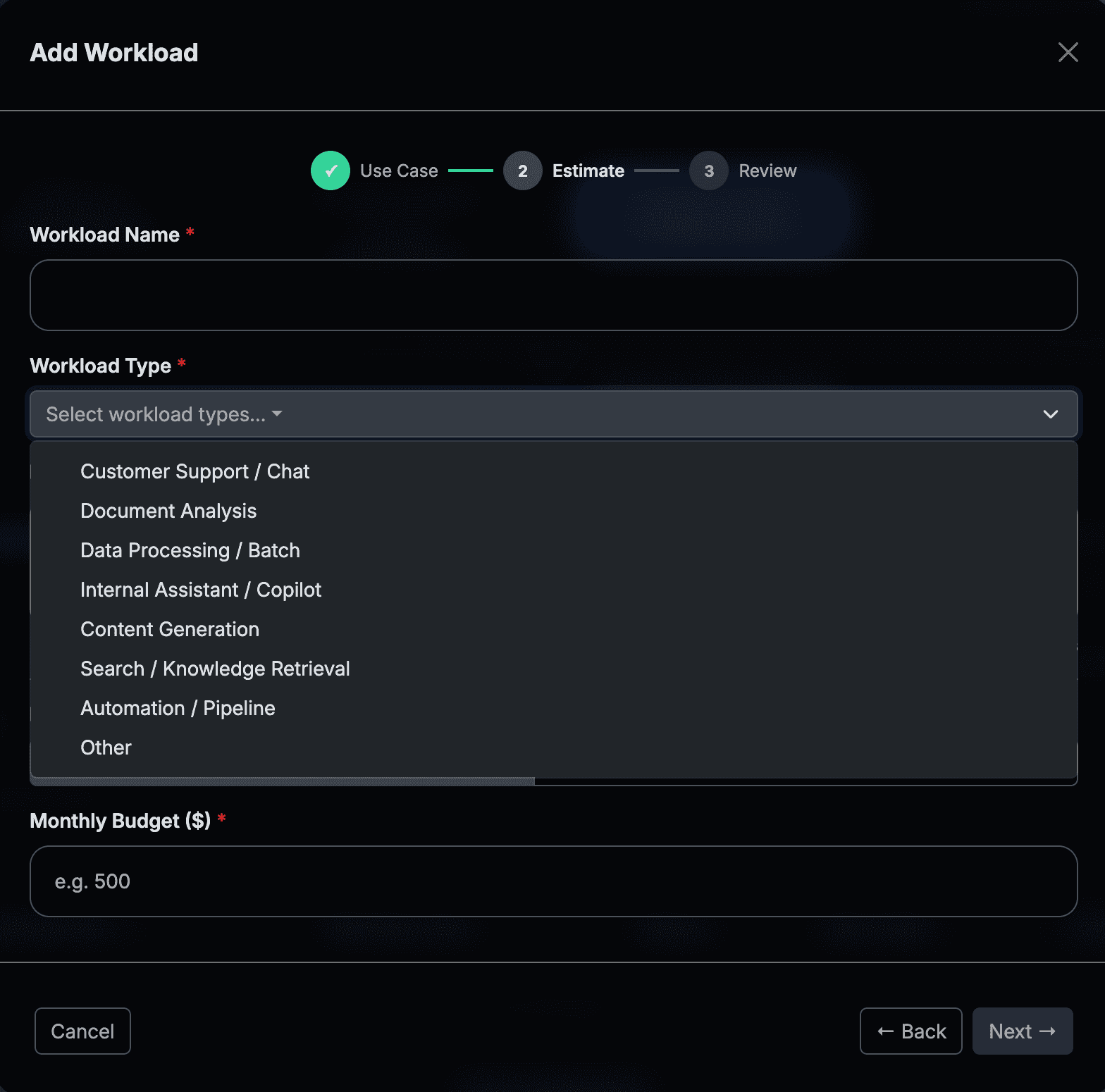
Product Owners onboard AI workloads through a three-step wizard. They pick a use case type, describe the workload in their own terms, set a budget, and select an availability requirement. The model, platform, AWS account, and region are decided downstream by the people responsible for those decisions.

Two paths in the wizard: Create a new workload or Add AI capabilities to an existing workload. Adding to an existing workload appends an AI component to the parent record: no new workload is created, and spend rolls up to the same budget owner.

Coding
Developer productivity: AI-assisted development, code generation, code review

The Product Owner answers two business questions. FinOps Center estimates the monthly cost. Actual cost depends on model selection made by the FinOps Lead.

How many developers will use AI assistance?
e.g. 15 developers
What percentage of their workday will they actively use AI?
e.g. 60% of workday

Estimated monthly cost is calculated from these inputs. Actual cost depends on model selection made by your FinOps Lead.

Operations
Business workloads: customer support, document processing, automation, internal tools

The Product Owner describes what the application does, who uses it, how often, and what availability their workload requires.

Workload name and type
e.g. Customer Support Bot
Describe what this application does, who uses it, and how often
Free text · up to 500 characters
Availability requirement
Standard · or · Production / High Availability
Monthly budget estimate
Dollar budget or token breakdown
Availability Requirement: a business decision, not a technical one
Standard

Single region. Standard Bedrock pricing. Appropriate for internal tools, dev workloads, and non-critical applications.

Production / High Availability

Cross-region inference profile. Approximately 10% pricing premium. Appropriate for customer-facing or SLA-bound workloads.

Requestor Runtime: required, select at least one

The Product Owner selects the runtime their application uses. FinOps Center uses this selection to auto-generate the IAM trust policy for the Cloud Engineer task. No AWS knowledge required from the PO, no policy authoring required from the engineer.

Auto-generates trust policy
AWS Lambda
lambda.amazonaws.com
Amazon ECS Task
ecs-tasks.amazonaws.com
Amazon EC2
ec2.amazonaws.com
AgentCore Runtime
Attribution via resource ARN
Other
Enter custom principal ARN
Product Owner Add Workload: use case selection modal

The Product Owner's submission flow: use case, workload context, and budget. No AWS access required.

FinOps Lead

Every technical governance decision, owned by one role.

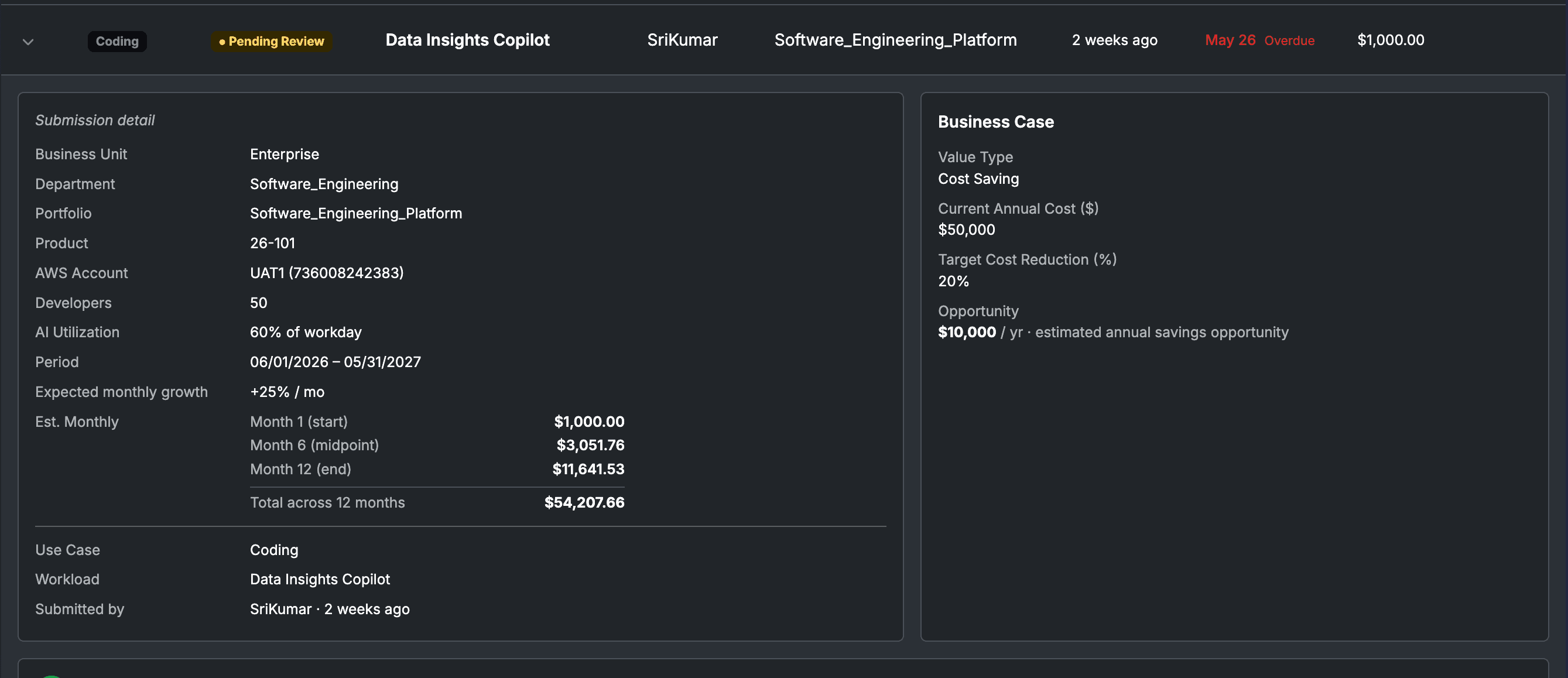
The FinOps Lead receives each Business Request with full business context, team size, AI utilization rate, workload description, availability requirement, and estimated budget. They select the platform, assign the model, account, and region. One approval generates every downstream task automatically.

Step 1 of 4
Review Request

Full business context from the PO: team size, AI utilization, workload purpose, availability requirement, and estimated monthly cost.

Step 2 of 4
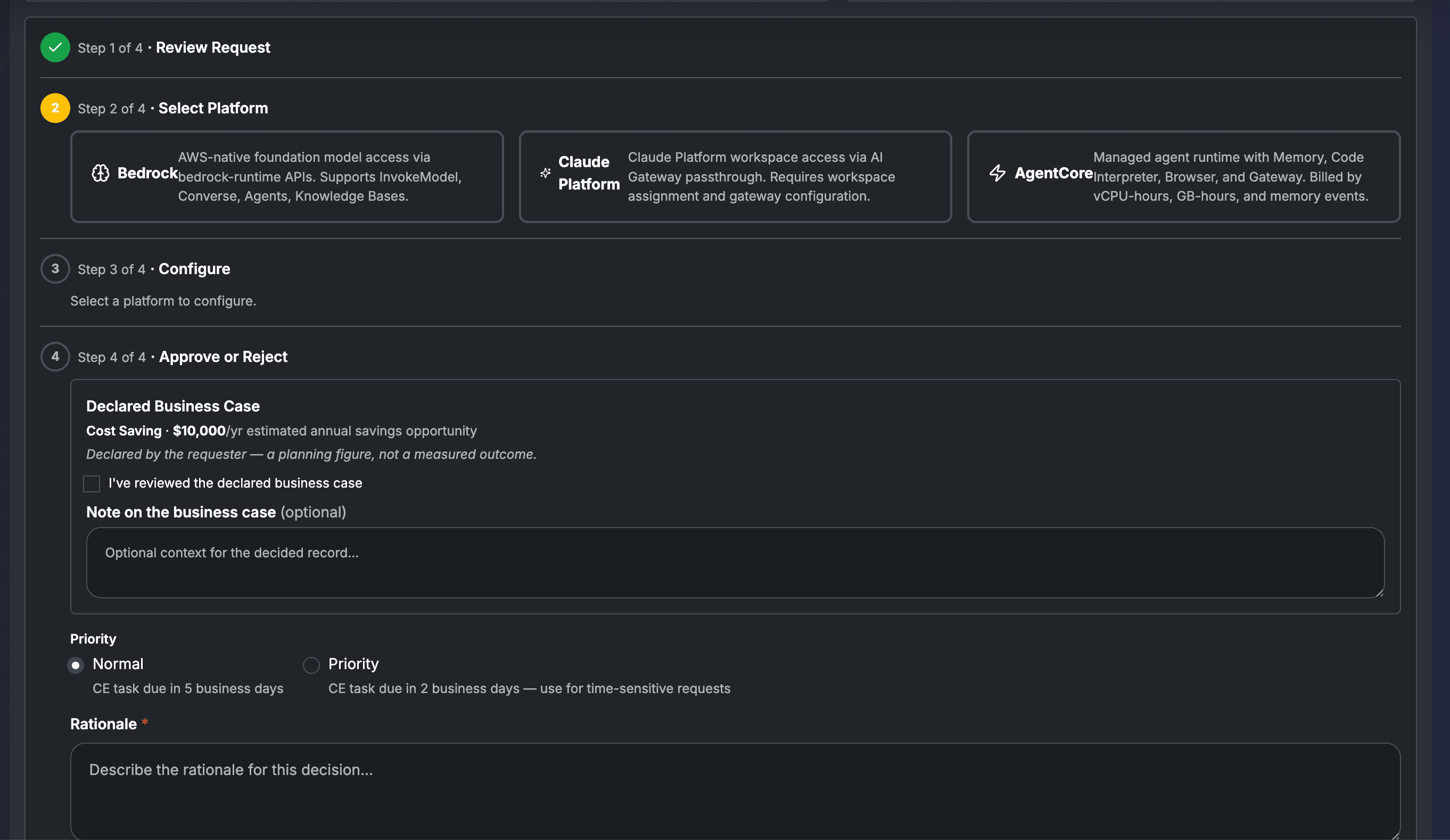
Select Platform

Choose Amazon Bedrock, AWS Marketplace Models, or Claude Platform based on workload type, organizational standards, and billing model.

Step 3 of 4
Configure & Estimate

Assign model, AWS account, region, and IAM role name. For Claude Platform: name the workspace the workload will use. Sets the FA Confirmed Estimate, a dollar or token figure informed by live Bedrock pricing that drives weekly Spend Cards and Estimate Coverage in the Governance Maturity model.

Step 4 of 4
Approve or Reject

Review the declared business case and acknowledge it. The product surfaces the honesty disclaimer: "a planning figure, not a measured outcome." Set task priority: Normal (CE task due in 5 business days) or Priority (2 business days). Write the rationale. Approve generates all CE tasks automatically.

FinOps Lead Business Request review: 4-step flow with platform selection

The FinOps Lead review: business context on top, platform selection and configuration below. One approval generates all downstream tasks.

FinOps Lead Business Request approval: declared business case acknowledgement, priority setting, and rationale

Step 4: the declared business case is surfaced with the honesty disclaimer, a planning figure, not a measured outcome. FA acknowledges before approving. Priority flag sets the CE task SLA.

Approving a model in the catalog opens the door. A Business Request is what ensures no workload walks through it without a named budget owner and a confirmed estimate. The FA Confirmed Estimate, set during configuration using live Bedrock pricing for the selected model, is the number that drives weekly Spend Cards and Estimate Coverage in the Governance Maturity model. The Product Owner's budget request is context; the FA Confirmed Estimate is the official figure both parties see in Spaces.

Workload status lifecycle: from submission to live attribution
Pending ReviewFA queue
ApprovedCE tasks generated
CE In ProgressEngineer executing
Ready to ClaimPO notified in Spaces
LiveAttribution active

Cloud Engineer

Pre-built tasks. Pre-written commands. No judgment calls.

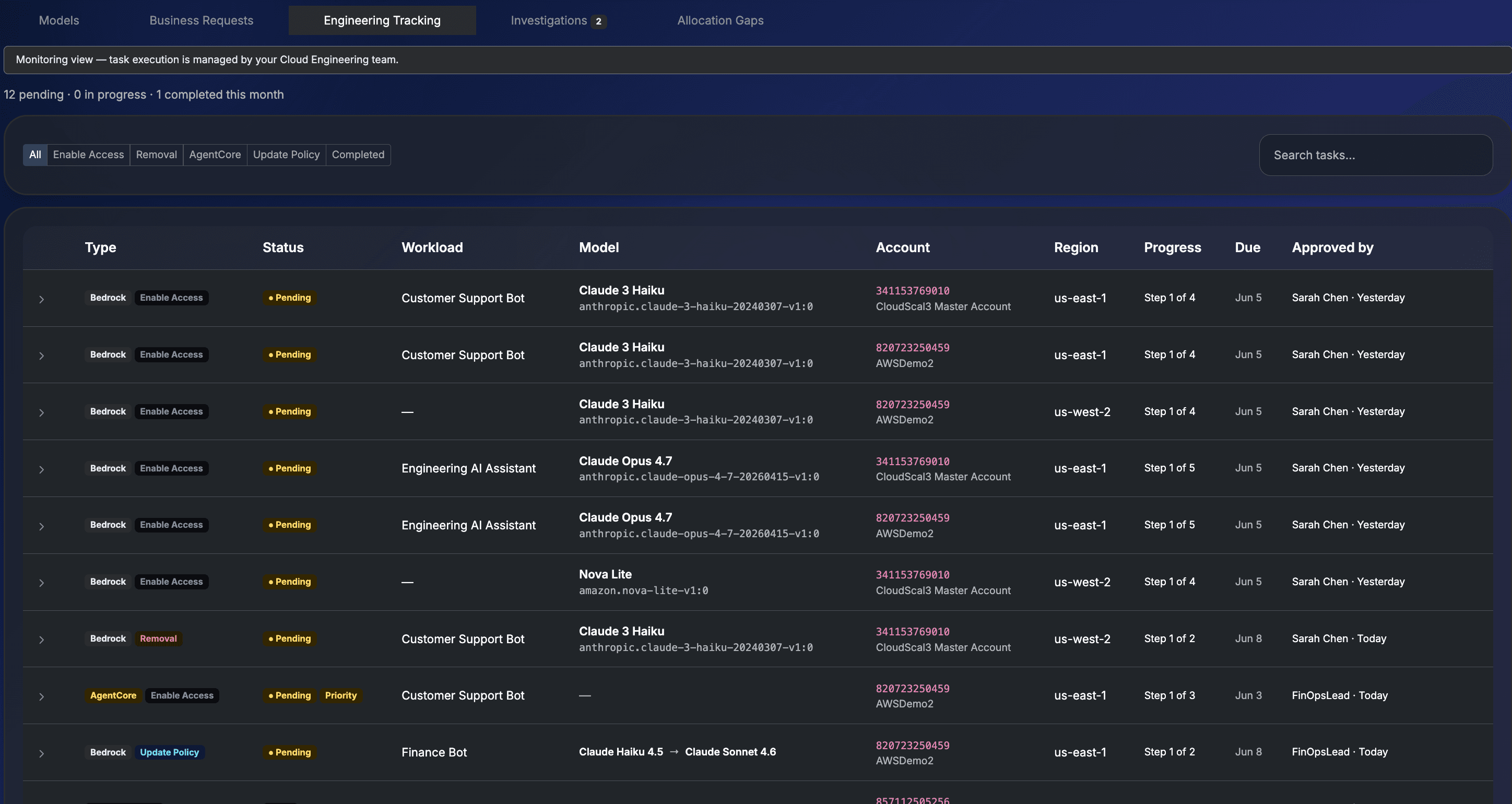
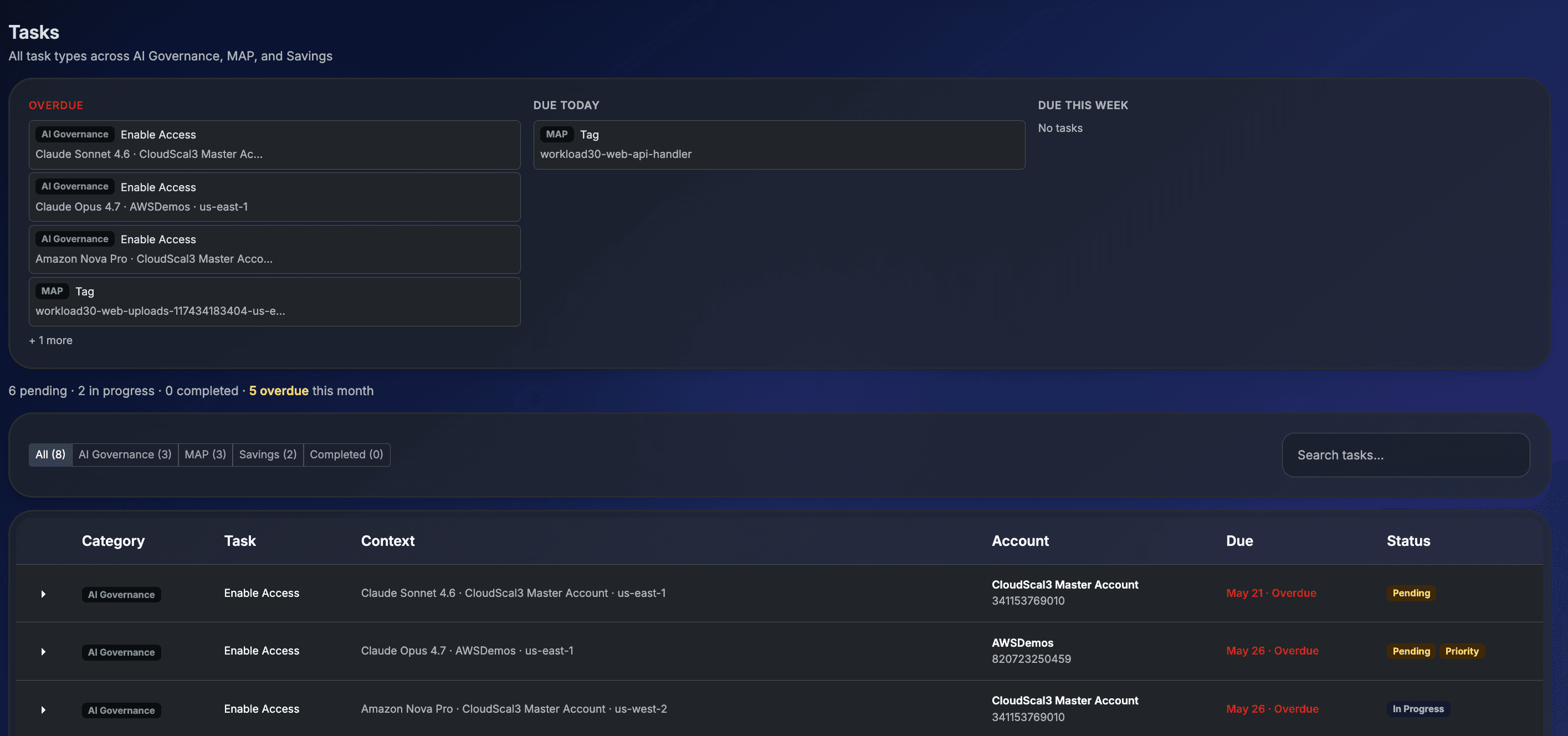
When the FinOps Lead approves a Business Request, FinOps Center generates every Cloud Engineer task: workload name, model ID, account, region, IAM role name, and exact CLI commands pre-populated. The engineer executes what was decided. They never author a policy or make a governance decision.

Engineering Tracking: Cloud Engineer task queue with model, account, region, and step progress

Engineering Tracking: every approved Business Request generates tasks with type, model, account, region, and step progress pre-populated.

Bedrock Enable Access: 4 steps for all native Bedrock and AWS Marketplace Model workloads
Step 1 of 4
Verify Model Access

Confirm the model is accessible in the target account and region. AWS CLI command provided.

Step 2 of 4
Create IAM Role

Role name auto-generated: finops-{workloadName}-{4charId}. The IAM role is the attribution anchor: it is what makes line_item_iam_principal appear in CUR.

Step 3 of 4
Configure Permission Policy

Apply the generated policy with bedrock:InvokedModelId condition key scoped to the approved model ARN. Exact CLI command provided.

Step 4 of 4
Mark Implemented

Task complete. FinOps Center generates the Developer Handoff block: IAM Role ARN and Model ID, ready to paste into the application SDK configuration. The workload status moves to Ready to Claim and the Product Owner is notified in Spaces.

Handoff
Developer Handoff: generated at Mark Implemented

When the Cloud Engineer marks the task implemented, FinOps Center generates a Developer Handoff block containing the IAM Role ARN and Model ID. The Product Owner sees this directly in their Spaces workload detail. Copy individually or copy all to paste into the application SDK configuration.

IAM Role ARN
arn:aws:iam::341153769010:role/finops-customer-support-bot-a4f2
Model ID
anthropic.claude-haiku-4-5-20251022-v1:0
MAP

MAP tasks are separate. For workloads eligible for MAP migration credits, a dedicated MAP Tag task creates an Application Inference Profile tagged map-migrated=mig{MPEID}, independent of the Enable Access flow. See AI MAP & Migration Tracking for the full MAP task lifecycle.

Cloud Engineer task detail: Bedrock Enable Access with CLI commands, approval rationale, and step progress

Task detail: platform, approval rationale, step progress, and CLI commands pre-written for each step. The engineer executes. They author nothing.

Weekly Spend Cards

AI spend moves too fast for a monthly review.

A single code deployment or new prompt template can 10x token consumption overnight. By the time a monthly invoice surfaces the spike, four weeks of unbudgeted spend have already happened. FinOps Center generates a Spend Card for every claimed workload every week: actuals vs estimate, broken down by model, region, and token type.

Traditional AWS spending

Monthly review cadence: manageable.

Compute, storage, and network costs change slowly and predictably. Drift is gradual and visible in trend data. A monthly invoice review is workable.

AI token spending

Weekly review cadence: essential.

Token consumption can spike overnight. A new prompt template, a new user cohort, a code change, all can 10x spend before the next monthly review. Weekly Spend Cards catch variance when it's still recoverable.

01Forward Estimate

The Product Owner sets a token or dollar estimate before spend begins. Budget intent is captured before a single API call. The application that invokes the model is the only party that knows how often it calls, with what prompt sizes, and whether caching is in play, so the estimate sits with whoever owns the workload.

02Weekly Spend Card

Actuals vs estimate every week, broken down by model, token type (input / output / cache-read), and region. Variance is flagged automatically. Overspend draws attention without blocking the workload. The goal is accountability, not a gate.

03Two-Tier Sign-Off

Product Owner accepts the card if spend matches expectations, or disputes with flagged lines routed back to the FinOps Lead. Portfolio Owner approves the rollup. Finance gets a chargeback-ready record every week, not every quarter.

AI Governance Maturity

Maturity is a trajectory, not a grade.

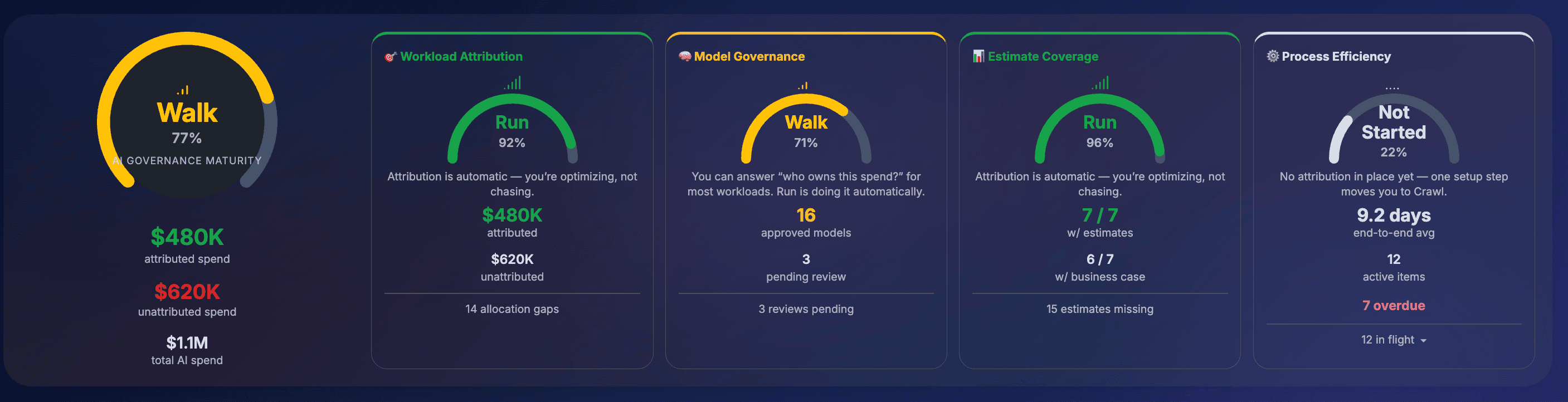
FinOps Center measures AI governance across four categories, each rated on a Not Started → Crawl → Walk → Run scale. A category that's Crawling is not failing. It is at an early, often perfectly acceptable, stage. The rating shows where you are and what moves you forward. Each dimension shows what closing its gap is worth in attributed dollars.

Not Started< 40

The practice isn't established yet for this category. AI spend is happening without the governance step in place.

Crawl40–59

The basics are forming; coverage is partial. The practice has begun, not yet consistent across your AI estate.

Walk60–89

The practice is working for most of your AI spend. You can answer "who owns this?" for the majority of your AI cost.

Run90+

The practice is the default. It happens automatically. Optimizing, not chasing.

Maturity tier definitions aligned to the FinOps Foundation framework · Overall maturity is a weighted blend of the four category scores.

AI Governance Maturity: four dimension gauges showing current tier and advancement trajectory

AI Governance Maturity: current tier per dimension with the next advancement move. Each gap shows what closing it is worth in attributed dollars.

Workload Attribution
CrawlWalk
Model Governance
WalkRun
Estimate Coverage
CrawlWalk
Process Efficiency
WalkRun
Workload Attribution40%
44% · $480K attributed · $620K unattributed · 14 allocation gaps

The percentage of AI spend attributed to a specific workload owner, where FinOps Center can answer "which application, and which budget owner, is responsible for this?" Attribution turns "this account spent $50K on AI" into "the Customer Support Bot spent $30K, the Document Platform spent $20K."

To advance → Claim the dedicated IAM role for each AI workload in Spaces and close Allocation Gaps where spend runs through broad shared roles.
Model Governance25%
84% · 16 approved models · 3 pending review

The percentage of active AI models that are approved for use, enabled in the accounts and regions where they're running, and free of governance gaps. Before governance, any developer could call any model in any account with no approval and no accountability. Model Governance is the gate.

To advance → Approve and scope models in active use, ensure each is enabled where it runs, and resolve Allocation Gaps flagging out-of-scope or unapproved usage.
Estimate Coverage20%
52% · 12 of 27 workloads with estimates · 15 missing

The percentage of claimed AI workloads with a budget estimate set, a forward-looking figure for what the workload is expected to cost. An estimate lets a Product Owner course-correct mid-period instead of learning about overspend at quarter-end. A workload with no estimate is spend with no plan.

To advance → Set an estimate for each workload missing one, using the Add Workload wizard in Spaces or the Business Request, and include a start/end period and expected monthly growth rate.
Process Efficiency15%
68% · 9.2 days end-to-end avg · 3 overdue · 12 in flight

How quickly governance work moves from Business Request submission through FinOps Lead approval and Cloud Engineer enablement to a claimed, live workload. Governance that is slow becomes governance that gets bypassed. Keeping the cycle short is what keeps the whole model credible.

To advance → Clear overdue items in the Tasks and Business Requests queues, keep approvals moving promptly, and use the Priority flag for time-sensitive requests.

Example action: Closing 14 Allocation Gaps advances Workload Attribution from Crawl to Walk, attributing $620K of unattributed AI spend to named budget owners and enabling Spend Cards for 15 additional workloads.

Agent Bill

AWS AI billing is complex. Agent Bill makes it plain.

CUR data, IAM principals, token billing, inference profiles: none of that should land on a Product Owner or Portfolio Owner. Agent Bill absorbs the complexity and returns plain language answers, scoped to each person's role and financial hierarchy. No dashboards. No AWS knowledge required.

Product Owner

Am I tracking on or over my token estimate this period?

Agent Bill
Agent Bill

Your Engineering AI Assistant workload has consumed $198 of your $340 monthly estimate, 58% through the month at 67% of budget. You're tracking well. Cache hit rate is 22%, which is healthy for a coding workload. Daily trend is flat for the last 5 days.

FinOps Lead

Which of my Products has the highest AI cost this month?

Agent Bill
Agent Bill

The Customer Support Bot is leading at $4,840 this month, up 23% from last month, driven by a 15% increase in invocations and a shift toward Claude Opus 4.7. The Document Platform is second at $2,100. Both have confirmed estimates and claimed roles. No Allocation Gaps on either.

FinOps Lead

Are any of my workloads using models that aren't approved?

Agent Bill
Agent Bill

Yes, 2 Allocation Gaps this week. Claude Opus 4.7 has 140 invocations from the checkout-service role in Pre-Prod with no approved Business Request: Not Business Approved. Nova Lite has 8 invocations from an unclaimed finops-ai role in the data-science account: Unclaimed AI Allocation. Both need action in the Allocation Gaps tab.

When spend needs to stop, Agent Bill is the kill switch

If a workload is consuming way over budget and needs to stop immediately, the Product Owner types the request into Agent Bill. A single MCP action fans out: the IAM role is tagged, an SCP fires on the next Bedrock call, spend stops within seconds, before CUR has even registered the spike. FinOps Center surfaces the workload as SUSPENDED with a full audit record. The FinOps Lead reviews and resumes when investigation is complete.

ACTIVE
ALERTING
INVESTIGATING
SUSPENDED
RESUMED
Investigations: the signal between gaps and disputes

When AI spend moves in unexpected ways, such as a spike in a single hour, a new IAM principal appearing in an account with no Business Request, a model suddenly consuming 10× its baseline, FinOps Center surfaces it as an Investigation. The FinOps Lead reviews the signal, assigns it to an owner, or links it to an existing Allocation Gap. Nothing falls through the cracks between weekly Spend Cards.

Allocation Gaps

AI spend Finance cannot attribute gets surfaced and actioned inline.

Allocation Gaps are not compliance violations. They are attribution gaps that prevent Finance from answering “who owns this spend?” FinOps Center detects six gap scenarios and routes each to the right action, without leaving the governance view.

The noisy neighbor problem: why attribution matters in shared accounts

When two budgets share an AWS account, every Bedrock dollar is split evenly regardless of who made the call. When a workload's IAM role is claimed, that spend exits the shared pool and flows 100% to the right budget. Without workload-level attribution, shared accounts systematically mischarge non-AI budgets for AI spend, and nobody has the data to correct it.

Prerequisite

Most enterprise CUR exports were created before line_item_iam_principal existed. This field GA'd in April 2025 and requires opt-in on the CUR 2.0 export settings. Existing exports cannot be retroactively updated. Without it, no AI attribution works. Most enterprise CUR exports were created before this feature existed, making it the most common starting point for organizations beginning the governance journey.

FinOps Center validates this at onboarding and surfaces it as a blocking task before anything else proceeds. One new CUR export with Include caller identity selected unlocks workload attribution across your entire AI estate.

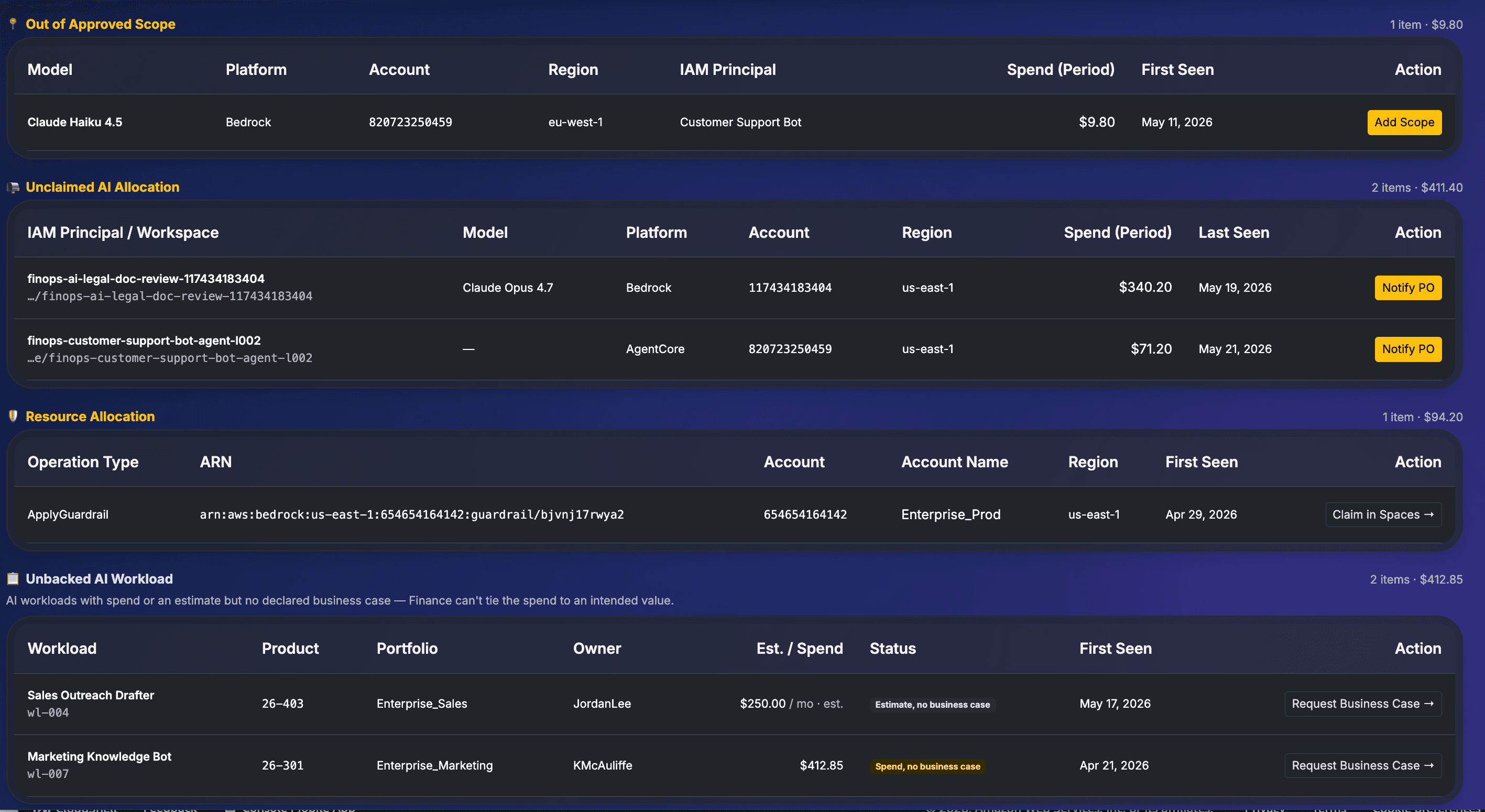
Allocation Gaps: Declared AI Value Opportunity banner with gap categories and inline actions

Allocation Gaps: declared AI value opportunity (Cost Saving / Revenue Driving) shown at the top. Six gap categories with spend totals and inline actions.

Role Recommendation

IAM principal is a broad shared SSO role

The caller is AWSAdministratorAccess, AWSPowerUserAccess, or similar. The identity is known but the workload is not. Spend cannot be routed to a specific workload budget. FinOps Center recommends creating a dedicated role.

FinOps Lead inline action
Recommend Dedicated Role
Not Business Approved

Model invoked with no approved Business Request

A model is being called in AWS with no corresponding Business Request in FinOps Center. The invocations are real, the cost is real, no Product Owner has a workload claim or declared business case.

FinOps Lead inline action
Approve or Block
Out of Approved Scope

Model approved but called outside the approved scope

The model has an approved Business Request, but CUR shows usage in an account or region not included in the original approval boundary. The approval scope has been exceeded.

FinOps Lead inline action
Add Scope
Unclaimed AI Allocation

Dedicated role or workspace exists with spend, no PO claim

A finops-ai-* IAM role or Claude Platform workspace was created through the CE task workflow and has spend in CUR, but no Product Owner has claimed it in Spaces. Attribution is halfway there; accountability is not.

FinOps Lead inline action
Notify PO
Resource Allocation

Bedrock Guardrail ARN in CUR with no workload claim

Guardrail rows appear with their ARN as line_item_resource_id. Unlike model invocations, Guardrail rows never emit line_item_iam_principal, so the ARN is the only attribution anchor. Spend is real but unassigned.

FinOps Lead inline action
Claim in Spaces
Unbacked AI Workload

AI workload with spend or estimate but no declared business case

A workload has real spend or a set estimate but no declared business case. Finance cannot tie the spend to an intended value. The workload owner has not declared what this AI investment is funded to produce.

FinOps Lead inline action
Request Business Case
ACTIVE
ACTIONED
RESOLVED
RECALLED

Every gap has a status lifecycle. When a FinOps Lead actions a gap, such as approving, assigning, or creating a Business Request, the record moves from Active to Actioned to Resolved. If circumstances change, a decision can be Recalled and revisited. The original decision is never deleted.

Every action carries a timestamp, rationale, and the identity of the person who made it. Finance gets an audit trail, not just a snapshot. These are allocation gaps, not compliance violations. The goal is always attribution: connecting every AI dollar to a budget owner.

Deployed on AWS

Your data never leaves your account.

FinOps Center deploys inside your AWS account via AWS Marketplace. This is not a positioning claim. It is an architectural fact that AWS formally recognizes with the Deployed on AWS Marketplace badge, enabling PPA/EDP spend retirement eligibility for enterprise buyers.

Your CUR stays in your S3

AI attribution data, model approvals, IAM role assignments, and spend cards all live in an account you control. No cross-account IAM to a vendor.

No third-party data processor

Your billing metadata never lands in a vendor database. No compliance review required. No vendor lock-in on your own billing data.

PPA/EDP spend retirement eligible

Deployed on AWS badge means FinOps Center spend counts toward your AWS committed spend, unlike SaaS FinOps tools that do not retire EDP.

CapabilityFinOps CenterVantage / nOps / Finout
Deployed in customer AWS account
Workload-level AI attribution
Model approval governance workflow
Business Request → CE Task → PO Claim
Shared account chargeback accuracy
AI Governance Maturity model (Crawl / Walk / Run)
Allocation Gaps detection (6 scenarios)Partial
Claude Platform (CCU) support
PPA/EDP spend retirement eligibility

Supported Platforms

The FinOps Lead selects the platform at Business Request review time. The governance model, covering submission, approval, task generation, and Agent Bill attribution, is identical across all four. The implementation and attribution mechanics differ.

Bedrock
Per-token billing

Amazon Bedrock

IAM principal attribution via CUR 2.0. FinOps Center auto-generates the IAM role name and CLI commands. Two workload paths: Operations (dedicated role) and Coding (IAM Identity Center + session tags).

  • line_item_iam_principal attribution, no tagging required
  • Auto-generated role: finops-{workloadName}-{4charId}
  • Pre-built CE task with pre-written CLI commands
  • bedrock:InvokedModelId condition key enforced
  • MAP AI eligibility via Inference Profiles
See Bedrock governance
AWS Marketplace Models
Billed by model provider
New

Third-Party Models via Bedrock

Third-party foundation models accessed through AWS Marketplace via Bedrock, including models from Anthropic and other providers. Each provider bills as their own legal entity in CUR, separate from native Bedrock charges. IAM principal attribution applies the same way: the workload's dedicated role appears in line_item_iam_principal for every inference call.

  • Attribution via line_item_iam_principal + inference profile ARN
  • Provider billed as their own legal entity in CUR
  • Governed IAM role with pre-written CE implementation tasks
  • Same 4-step Enable Access task as native Bedrock
  • EDP-eligible via Deployed on AWS purchase path
Claude Platform
CCU billing
New

Claude Platform on AWS

Claude Platform bills in Claude Consumption Units (CCU) via AWS Marketplace. The workspace is the allocation unit. Each workspace maps to a portfolio or product team via CUR tags. The FinOps Lead names the workspace at Business Request approval time. The Cloud Engineer creates it via a 3-task chain.

  • Workspace allocation: portfolio-level via CUR tags
  • FinOps Lead names workspace at Business Request approval
  • Cloud Engineer creates workspace via 3-task chain
  • CCU billing at $0.01/CCU, not token-based
  • Workspace is the V1 allocation scope. Workload-level attribution is roadmap.
See Claude Platform governance
AgentCore
vCPU-hours · GB-hours
New

Amazon Bedrock AgentCore

Managed agent runtime with Memory, Code Interpreter, Browser, and Gateway capabilities. Billed by vCPU-hours, GB-hours, and memory events, a different billing model from per-token Bedrock. FinOps Center applies the same Business Request → approval → CE task → PO claim governance flow.

  • Same 4-actor governance flow as Bedrock and Claude Platform
  • Billed by compute (vCPU-hours, GB-hours, memory events)
  • IAM-based attribution via line_item_iam_principal
  • Supports Memory, Code Interpreter, Browser, Gateway capabilities
  • CE task generated at FinOps Lead approval